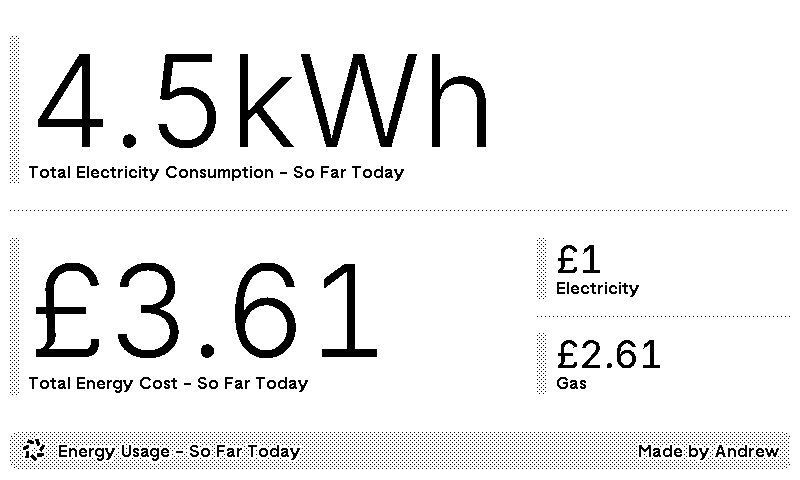
If you’re lucky enough to have an Octopus Mini Go you may be regularly opening the Octopus app and checking in on how much you’ve spent on your energy so far in the day. I do this often; it’s interesting to see how much power I’m using in my home from time to time, though probably a bad habit…
I’m a big fan of ambient information and the TRMNL has been amazing in both my office and my kitchen for sharing information with me and my partner throughout the day. The battery lasts for months, and it’s a lot of fun to play with all the supported integrations.
Rather than check the Octopus app throughout the day, I wanted to build a private plugin to display the energy cost and consumption throughout the day on my TRMNL. Luckily, Octopus provides both a REST and GraphQL API, so I broke out Deno and Deno Deploy and put together an HTTP endpoint that TRMNL could hit to get the latest data.
If you’d like to build your own, or use the Octopus API effectively, the steps below will help get you up and running. I’ve also shared a gist on GitHub of a Codex-generated script based on this article that can be used to get going quickly.
Get Authenticated
I used Octopus’s GraphQL API as it’s a single entry point to build against, and the self-describing nature helped debug issues during the build. To get started, register for an Octopus API key, then make a mutation request to obtain a Kraken Token that will be used to authenticate further requests.
https://api.octopus.energy/v1/graphql/ Headers
- Content-Type
- application/json
Variables
- input
- { APIKey: octopusApiKey }
- ObtainJSONWebTokenInput!
Query
mutation ObtainKrakenToken($input: ObtainJSONWebTokenInput!) {
  obtainKrakenToken(input: $input) {
    token
    payload
    refreshToken
    refreshExpiresIn
  }
}
On success, use the res.data.obtainKrakenToken.token string in an Authorization header for subsequent requests.
Getting Gas & Electricity Meter Information
To pull the energy consumption for any gas and electricity meters you need the smart meters’ device IDs. These are strings made up of 8 groups of 2 characters, separated by a dash such as A0-00-0A-AA-00-0A-0A-00. The GraphQL API exposes these under the electricityAgreements and gasAgreements query.
The agreement queries also provide information about the unit rates for the electricity agreement, and standing charges against each agreement, so we can grab those in the same request.
Agreement queries are nested under an account query, which takes accountNumber as a parameter. Octopus account numbers can be found when logging in to the Octopus Account Dashboard, and look something like A-000A0A00.
https://api.octopus.energy/v1/graphql/ Headers
- Content-Type
- application/json
- Authorization
- Bearer {tokenFromAuthReq}
Variables
- accountNumber
- A-000A0A00
- String!
Query
query($accountNumber: String!) {
  account(accountNumber: $accountNumber) {
    electricityAgreements(active: true) {
      meterPoint {
        meters {
          smartDevices {
            deviceId
          }
        }
      }
      tariff {
        ... on StandardTariff {
          standingCharge
          unitRate
        }
        ... on DayNightTariff {
          standingCharge
          dayRate
          nightRate
        }
        ... on HalfHourlyTariff {
          standingCharge
          unitRates {
            validFrom
            validTo
            value
            preVatValue
          }
        }
        ... on PrepayTariff {
          standingCharge
          unitRate
        }
      }
    }
    gasAgreements(active: true) {
      meterPoint {
        meters {
          smartDevices {
            deviceId
          }
        }
      }
      tariff {
        standingCharge
      }
    }
  }
}
Getting Meter Reading Telemetry
The final parameter needed to request meter reading telemetry is the date range we’d like readings for. Using Luxon, we can get today’s UK start and end times in UTC.
const getUtcTodayDateRange = (): [string, string] => {
  const now = luxon.DateTime.now().setZone('Europe/London');

  return [
    now.startOf('day').setZone('utc').toISO(),
    now.endOf('day').setZone('utc').toISO()
  ];
};
The final request can then be made to retrieve both electricity and gas meter reading telemetry, alongside the gas costs.
https://api.octopus.energy/v1/graphql/ Headers
- Content-Type
- application/json
- Authorization
- Bearer {tokenFromAuthReq}
Variables
- elecDeviceId
- {electricityDeviceId}
- String!
- gasDeviceId
- {gasDeviceId}
- String!
- startUtc
- {startOfTodayUtcIso}
- DateTime!
- endUtc
- {endOfTodayUtcIso}
- DateTime!
Query
query(
  $elecDeviceId: String!
  $gasDeviceId: String!
  $startUtc: DateTime!
  $endUtc: DateTime!
) {
  elecTelemetry: smartMeterTelemetry(
    deviceId: $elecDeviceId
    grouping: HALF_HOURLY
    start: $startUtc
    end: $endUtc
  ) {
    readAt
    costDeltaWithTax
    consumptionDelta
  }
  gasTelemetry: smartMeterTelemetry(
    deviceId: $gasDeviceId
    grouping: HALF_HOURLY
    start: $startUtc
    end: $endUtc
  ) {
    readAt
    costDeltaWithTax
    consumptionDelta
  }
}
Computing Energy Cost & Consumption
Gas and electricity total costs were computed slightly differently due to the tariffs I’m on, with electricity unit rates changing every half-hour and gas using a standard rate. I created one function that can be used to compute both gas and electricity consumption and costs for the day so far.
type EnergyStatistic = {
  totalWatts: number;
  totalCost: number;
};

const calculateEnergyStatistics = (
  telemetry: MeterReadingTelemetry[],
  getEnergyReadingCost: (reading: MeterReadingTelemetry) => number
): EnergyStatistic => {
  let totalWatts = 0;
  let totalCost = 0;

  for (const reading of telemetry) {
    const numberWatts = Number(reading.consumptionDelta);
    if (isFinite(numberWatts)) {
      totalWatts += numberWatts;
    }

    totalCost += getEnergyReadingCost(reading);
  }

  return {
    totalCost,
    totalWatts,
  };
};
Creating an Endpoint
Using Express, I created an endpoint that can respond with the current day’s consumption and cost, with some basic request authorisation middleware to protect it on the public internet.
const handleGetEnergyStatisticsRequest = async (_: Request, res: Response): Promise<void> => {
  // Get a request token and pull the varied account and device information needed for further requests
  const reqToken = await octopus.getRequestToken();
  const accInfo = await octopus.getAccountInformation(reqToken, octopusAccountNumber);

  // Pull the energy data for the devices we found, for today
  const [startUtc, endUtc] = getTodayUtc();
  const energyData = await octopus.getEnergyTelemetry(
    reqToken,
    [accInfo.elecMeterDeviceId, accInfo.gasMeterDeviceId],
    startUtc,
    endUtc,
  );

  // Compute both gas and electric consumption and cost to respond with
  const gas = calculateEnergyStatistics(energyData.gasTelemetry, (reading): number => {
    const numberCost = Number(reading.costDeltaWithTax);
    return isFinite(numberCost) ? numberCost : 0;
  });

  const electricity = calculateEnergyStatistics(energyData.elecTelemetry, (reading): number => {
    const readAt = new Date(reading.readAt);

    // TLDR: If unit cost is a constant, use that - else find the unit rate based on the half-hour time slots
    const unitCost = typeof accInfo.elecUnitRate === "number"
      ? accInfo.elecUnitRate
      : accInfo.elecUnitRate.find(
        (rate) => readAt >= new Date(rate.validFrom) && readAt < new Date(rate.validTo),
      )?.value ?? null;

    const numberWatts = Number(reading.consumptionDelta);
    if (!isFinite(numberWatts) || typeof unitCost !== "number") {
      return 0;
    }

    return (numberWatts / 1000) * unitCost;
  });

  res.send({
    startUtc,
    endUtc,
    gas,
    electricity,
  });
};

app.get('/today', authRequest, handleGetEnergyStatisticsRequest);
With the endpoint deployed to Deno, I was able to create a private plugin via the TRMNL UI. The plugin will hit the endpoint periodically, and render the energy consumption and cost for the current day so far.